
SpinDog Casino Login and Registration
We’ve kept the SpinDog Casino login to two fields : email and password. Registration takes four fields total, nothing more. No app, no forms that scroll, no waiting period. GBP runs as default for UK players. Drop £20 and the 150 % welcome match plus 150 free spins kick in on the spot.
Similar Casinos for UK Players
Still shopping around? Check KYC turnaround times. No casino puts that number on the homepage, but it’s what decides how fast you actually get paid after your first win. We clear verification documents within 12 hours on working days. Spin Dog Casino login itself takes seconds, registration about two minutes, browser only. A few alternatives UK players often compare us against sit below.











Most sites accept pound deposits but convert to a different currency on the back end. That quiet 2–3% FX fee hits every deposit, every bet, every withdrawal. We run GBP natively across the whole platform, so £20 in means £20 on your balance, not £19.40. The SpinDog main page has the full catalogue, bonus terms and payment method list if you want specifics. Already got an account? Login walkthrough is next.
SpinDog Login for Existing Players
The SpinDog Casino login asks for two things : your email and your password. No username, no account number. You can add two-factor authentication from your settings, but it’s off by default. The form works in any browser on any device, and there’s no App to install or keep updated.
Session stays active until you log out or clear cookies, so you won’t type credentials every time you open the site
Jumping between games, the cashier and promotions won’t kick you back to the login screen
“Forgot your password ?” sits right under the Sign In button, one tap and you’re in the reset flow

That’s the short version. We built the SpinDog login to stay out of your way, not ask questions twice. Same email, same password, same form whether you’re coming back after an hour or a month. If you’d rather see it step by step with screenshots, keep scrolling.
How to Log In
Phone, tablet, laptop, doesn’t matter. Chrome, Safari, Firefox, Edge – any browser, same result. The login form pops up right on the main page, so there’s no separate login URL to find or bookmark. Spin Dog Casino login is three steps from here to your lobby.
- Open the site in any browser and tap Log In top right
- Enter your email and password, eye icon checks your autofill
- Tap Sign In, if 2FA is on a code prompt appears first

Password not working ? Reset link is one tap away on the login form. Something else keeping you out ? Common errors are covered further down. Don’t have an account ? Registration is four fields and it’s next.
SpinDog Registration for New Players
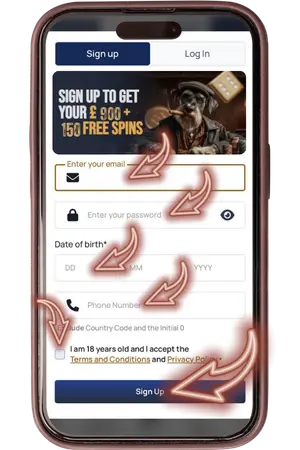
SpinDog registration is one form with four fields and a checkbox. No address, no full name, no document uploads at this stage. All of that comes later when you verify your identity before the first withdrawal. Make sure every field is accurate, because KYC will check your details against your documents. Here’s how the whole thing looks step by step.
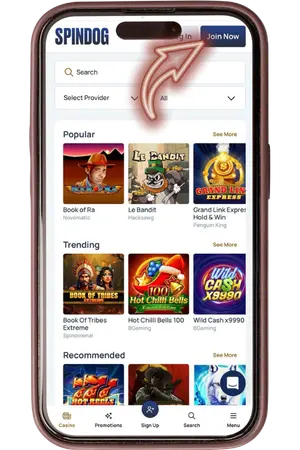
- Tap Join Now
The button sits in the top right corner of the homepage. The registration form opens as a popup over the main page, no redirect.

- Fill in four fields
Enter your email, create a password, type your date of birth and your phone number. The phone field takes UK numbers without the country code or the leading zero. Tick the checkbox confirming you’re 18+ and accept the Terms and Conditions, then tap Sign Up.
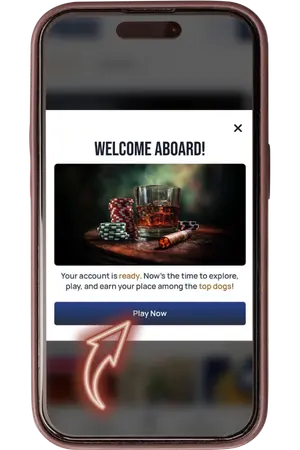
- You’re in
The “Welcome Aboard” screen loads straight away, no email confirmation needed. Tap Play Now and the lobby opens with the full navigation, game filters and your empty balance ready for a first deposit.
Your login works from that moment on. You can browse the game catalogue without depositing, but real-money play starts after you add funds. Drop £20 and the welcome offer kicks in automatically : 150 % match up to £900 plus 150 free spins, 30 per day over five days, no promo code needed. One account per person, one per email, one per phone number, so get the details right the first time. The next section covers what documents you’ll need when it’s time to cash out.
What Information Is Needed for Registration
The Spin Dog Casino login form asks for the bare minimum. But between SpinDog registration and your first cash-out, the platform collects more in stages. Easier to prepare everything upfront than to hunt for a utility bill when you’re trying to withdraw.
| What you provide | Details |
| At registration. Used for login and resets | |
| Password | At registration. Letters, numbers, symbols |
| Date of birth | At registration. DD/MM/YYYY, must match your ID |
| Phone number | At registration. UK format, no country code or leading zero |
| Address and postcode | After registration under Profile > General |
| Passport or driving licence | Verification stage. Uploaded before first withdrawal |
| Utility bill or bank statement | Verification stage. Dated within 3 months |
| Payment screenshot | Verification stage. Confirms your deposit method |
Everything in the top half of that table takes under a minute. The verification documents take longer only because you need to have them ready. Phone verification is handled by support, not an automated code, so message live chat when you’re ready to confirm your number. If your profile name doesn’t match your passport, verification stalls. One SpinDog login per person, one per email, one per phone number. Next up is how verification works and how long it takes.
KYC Verification
You can deposit and play before KYC, but you can’t withdraw. SpinDog login stays fully functional while your documents are under review, so there’s no downtime while you wait. The table in the previous section lists every document. Here’s what matters when you actually upload them through the Verification tab in your profile.
Identity. Clear photo or scan, no cropping and no blur. The full document must be visible
Address. Must be dated within 3 months. Name and address must match what you entered in your profile
Payment. Screenshot from your bank App or e-wallet showing a completed deposit to SpinDog

If a document gets rejected, check for blurry images, expired IDs or a mismatch between your profile and the document. Those are the most common reasons across the industry. Documents typically clear within one working day. Once approved, withdrawals open up : £4,000 per day, £8,000 per week, £30,000 per month. The next section covers what to do when something goes wrong with your SpinDog Casino login.
Common Login Errors and Account Access Issues
Most SpinDog Casino login problems take less than a minute to fix without contacting anyone. Check the list below first. If your situation isn’t here, live chat runs 24/7 and support can see your account history in real time.
Forgot your password. Tap the reset link below Sign In, enter your email, check spam if nothing shows up
2FA code not working. Make sure your device clock is set to automatic. Still stuck, live chat can disable 2FA after verifying your identity
Logged in from a new device and something looks off. Security tab, Session History, check IP and device, hit Terminate on anything unfamiliar
Want to change your password. Security tab. Current password in, new one in, done
Site not loading or behaving strangely. Clear browser cache, try incognito mode, or switch browsers. HTML5, no App to update
Nothing above helped. Live chat 24/7. Email at support@spindogcasinoofficial.com works too but chat is faster for login issues

One thing worth doing before you ever need this list : go to the Security tab in your profile and turn on two-factor authentication. It puts one extra step at SpinDog login but keeps your balance locked even if someone gets your password. Session History in the same tab lets you spot anything suspicious early. If you’ve got access sorted, the FAQ below covers everything else.