
SpinDog Casino on Mobile
Mobile play works on iPhone, iPad and Android through the browser, with 80+ studios in the lobby. In place of a SpinDog App, a home screen shortcut opens the casino in one tap, so nothing gets downloaded. UK players aged 18+ can deposit in GBP from £20, claim a 150% match up to £900 with 150 FS, and use live chat 24/7.
- SpinDog App Features on Mobile
- How to Access SpinDog on Your Phone
- SpinDog App for iPhone and iPad
- SpinDog Casino App for Android
- SpinDog Mobile Casino Games
- Can You Play SpinDog Slots on Mobile?
- How to Install SpinDog on Your Home Screen
- SpinDog Mobile Performance and Security
- SpinDog App Login on Mobile
- SpinDog Mobile Deposits and Withdrawals
- SpinDog App Bonus for New Players
- SpinDog App vs Mobile Browser
- FAQ
Playing does not depend on a laptop. The mobile version opens on a smartphone or tablet through the browser, so the account, the game lobby and the cashier go along on the bus or stay on the sofa. Anyone searching for a SpinDog Casino App will find that the site itself covers it, with every feature in place. Pages scale to the screen, and a thumb is all it takes.
SpinDog App Features on Mobile
The mobile version brings the account tools to a small screen, so the full feature set stays within reach. Anyone who wants the features of a SpinDog App will find them inside the browser version. Here is what sits behind the account menu.
| Feature | What It Does |
| Account | Personal details, deposit limits and session alerts sit in the settings |
| Games and tournaments | Qualifying bets earn leaderboard points automatically, and several events can run at once with no opt-in |
| Cashier | Deposits and withdrawals run in GBP from the same account |
| Bonuses | The welcome offer and weekly promotions attach to the account, and support can check wagering progress, stake caps and expiry dates |
| Promotions | 10% cashback up to £100 on net losses every Tuesday and Wednesday, credited by Thursday at 1:00 PM GMT, plus random Prize Drops during set event windows |
| Loyalty programme | The Dog’s Den has seven tiers from Bronze to Diamond, with points from regular play and automatic progress |
| Support | Real operators on chat and email who can open the account and act on it |
Because one account runs all of this, a bonus, a tournament entry and a cashback payment sit under the same login. Higher loyalty tiers bring bigger cashback rates and faster withdrawals, while the promotions list changes often enough to be worth a look every few days.
How to Access SpinDog on Your Phone
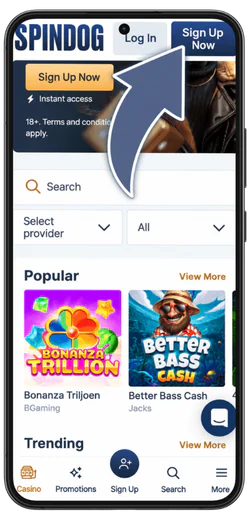
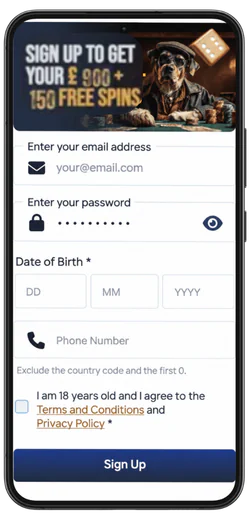
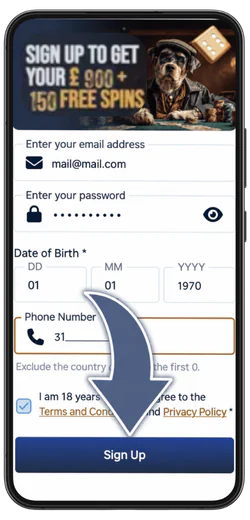
Getting into the casino from a phone takes a mobile browser, a Wi-Fi or mobile data connection and nothing else. Anyone who searches for a SpinDog Casino App lands on the same site, since the casino loads as a normal page with no installer to run. New players register first, which takes about two minutes and needs no deposit upfront. The route from the first tap to a created account looks like this.
- Open the form:
Tap Sign Up Now on the casino homepage.

- Enter the details:
Email, password and date of birth.
- Confirm:
Add the phone number without the country code and the first 0, tick the 18+ box and tap Sign Up.
- Pick a game:
Open the Casino tab, choose a category in the Sort by menu and tap a tile.
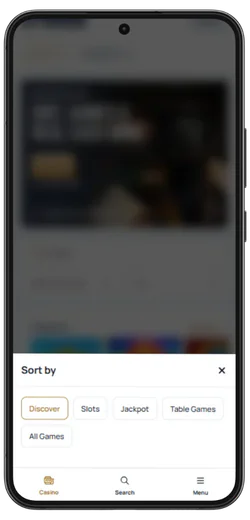
With the account set up, the lobby sits one tap away. Games can be filtered by provider, type or popularity, so a slot, a live table or a crash round is quick to find with a thumb. A tap on any tile opens the game in the same browser tab, and from there the first spin or bet is up to you.
SpinDog App for iPhone and iPad
Any iPhone or iPad on a current version of iOS or iPadOS can open the casino, since it runs as a web page rather than an installed program. Players who look for a SpinDog App in the App Store won’t find a separate download there, because the platform is built for the browser. Safari is the natural choice on Apple hardware, though Chrome, Firefox and Edge on iOS load the same HTML5 site. The layout adjusts to the screen, so an iPhone gets a compact lobby and an iPad gets more room per row.

- Safari comes preinstalled on every Apple device, so nothing needs setting up, and it is usually the quickest route to the login screen
- Chrome, Firefox and Edge work as well, which helps when one of them already stores saved passwords and bookmarks
- Portrait mode: suits slots and the cashier, while turning the device sideways gives live tables and crash games a wider picture
- On an iPad, the bigger display shows more of the lobby at once and leaves bet buttons extra space, so fewer mis-taps
- Face ID or Touch ID can fill in the login once iOS offers to store it in the keychain
- Up-to-date iOS and browser: avoids most loading faff, as old versions tend to struggle with live video
One habit is worth building on Apple devices. Private Browsing works fine for playing, but it wipes the session when the tab closes, so a player has to log in again every single time. A normal tab keeps things tidier. The account and balance are shared across devices, though each iPhone or iPad needs its own login.
SpinDog Casino App for Android
Android phones and tablets from any maker open the casino through the browser already on the device. A search of Google Play for the casino turns up nothing, so the browser is the only route. Chrome is the usual pick, and Samsung Internet, Firefox and Edge work just as well.
- No APK is needed. The casino loads straight in the browser, so there is no file to download, open or install, and nothing extra takes up space on the phone
- Enter the address by hand in the browser or use a bookmark, rather than tapping links in texts, ads or chat groups
- Third-party APKs: files on forums, file-sharing sites or social media that claim to be the casino app do not come from the operator, so they are best skipped
- Leave unknown sources switched off. Installing an APK means turning off the phone’s built-in block on outside files, a protection worth keeping
- Mind the account risk, because a fake app can copy a login, card details or crypto wallet info the moment they are typed in
Anyone who has already installed a file sold as the casino app should delete it, then change the password through the real site and check the bank statement for charges that look off. A clean browser session costs nothing and keeps the handset tidy.
SpinDog Mobile Casino Games
Every category in the lobby opens on a phone, and most titles run straight in the browser. Slots, live tables, jackpots, crash rounds and instant games all sit in the menu.
| Category | What’s Inside |
| Slots | The biggest section, from classic fruit-style reels to Megaways and Hold & Win titles |
| Live casino | Dealers streamed on camera from Evolution, Pragmatic Play and Playtech: roulette, blackjack, baccarat and game shows, all taking GBP bets |
| Table games | RNG roulette, blackjack, baccarat and video poker for a quick round with no wait for a seat |
| Jackpots | Progressive pools that grow with every bet, plus fixed-prize games with a set payout |
| Crash games | Short rounds with instant results, easy to play with one thumb |
| Instant games | Plinko, scratch cards and other quick-win formats |
New titles are added every week and show up in the phone lobby straight away, as there is nothing to update by hand. Stakes stretch from £0.10 spins to high-limit live tables, so a casual session and a bigger one fit the same account.
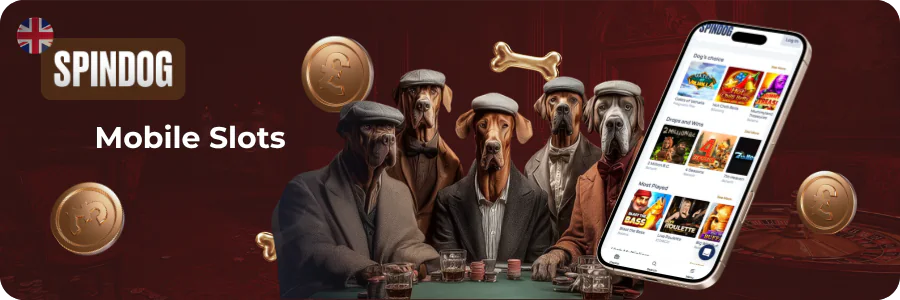
Can You Play SpinDog Slots on Mobile?
The slot catalogue is adapted to touchscreens, so reels, bonus rounds and menus fit the display, and picks such as Starburst, Gonzo’s Quest or high-variance Nolimit City titles are among those that run on a phone. Most slots also work in demo mode, which lets you test the volatility and the bonus mechanics before any money goes down. Each title shows its RTP before launch, so the maths is clear even on a small screen.
How to Install SpinDog on Your Home Screen
The browser can save the casino as an icon next to your other apps, and it takes one minute. Many players call the result a SpinDog Casino App, though it is only a shortcut to the website. The two cards below cover Safari on Apple devices and Chrome on Android.
A shortcut works differently from an installed program. It is a saved link, so it follows whatever the site shows and brings new games and promotions with no updates to run. Deleting the icon, the same way as any other, leaves the account and balance untouched, since both live on the casino side.
SpinDog Mobile Performance and Security
Mobile performance comes down to the connection and the browser, because the casino loads as a web page. The same security layers run on a phone as on a laptop, and the table lists what sits behind each one.
| Area | What Stands Behind It |
| Browser support | Current mobile browsers run the HTML5 platform on iOS and Android |
| Connection | Tested on iOS and Android, with performance holding up even on 4G |
| Encryption | 256-bit SSL encryption protects the link between the phone and the casino |
| Two-factor authentication | Optional second step on top of the standard encryption |
A padlock icon next to the address shows that the SSL connection is active, which is worth a glance before typing a password. Public Wi-Fi in cafes and stations is the weak spot, so mobile data or a trusted network is the safer pick for logging in and for the cashier. Switching on the optional second step is also worth doing, as it keeps the account protected if a password ever leaks.
SpinDog App Login on Mobile
A phone login takes two details: the email address from registration and the password. A returning player has no menus to hunt through, as everything sits in one window.
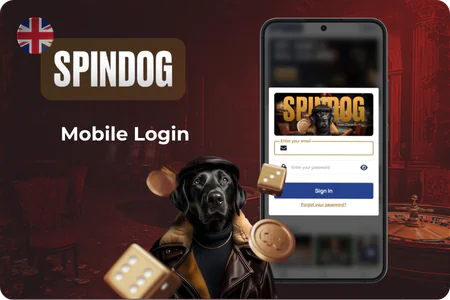
- Tap Log in, the tab that sits next to Sign up
- Type the email address used at registration into the first field
- Enter the password in the second field, and tap the eye icon on the right to see the characters and catch a slip on a small keyboard
- Press Sign In, the blue button under the fields, to open the account
- Forgot your password? The link under the button opens a page that asks for the email address, and Reset Password sends the recovery instructions by email
- No email in the inbox? A link under the button on the reset page requests the instructions again, and the spam folder is worth a look first
- Account locked? The same reset page covers it, and a Support link there leads to the team
Most failed sign-ins come down to a typo, caps lock or a different email from the one on the account. Players with more than one address should try the likeliest ones before resetting, because the recovery instructions go only to the email linked to the account.
SpinDog Mobile Deposits and Withdrawals
The cashier opens from the same account on a phone, so topping up and cashing out need no desktop. More than 10 payment methods work for UK players, and every transaction runs in GBP, which spares you any currency conversion on the card statement. The table below lists the main methods, limits and timings.
| Item | Details |
| Deposit methods | Visa, Mastercard, bank transfer and six cryptocurrencies like BTC, ETH and LTC |
| Minimum deposit | £20 across most methods |
| Fees | None added from the casino side |
| Crypto withdrawals | Processed within 24 hours |
| Bank transfer withdrawals | 3 to 7 working days |
| Card withdrawals | Standard banking times |
| Withdrawal limits | £4,000 per day, £8,000 per week, £30,000 per month |
For the exact timing on a pending payment, live chat on the phone is the quickest route. Operators there can pull up deposit and withdrawal status, limits by method and the gap between crypto and card timings, while email suits anything that can wait. Players on higher tiers of The Dog’s Den may see higher withdrawal thresholds than the figures above.
SpinDog App Bonus for New Players
New players who register get a first-deposit match of 150% up to £900, plus 150 free spins on Fish Fever by Truelab, with a minimum deposit of £20. It attaches to the account and not to the device, so a phone gets it in full. The table lists the conditions that come with it.
| Condition | Details |
| Free spins schedule | 30 per day for 5 days |
| Spin value | £0.10 to £0.25 |
| Before the spins activate | Deposit amount wagered at least 1x |
| Wagering on spin winnings | 40x |
| Max cashout from free spins | £300 |
| Max bet while wagering | £5 per round |
| Validity | 10 days for the bonus, 7 days for spin winnings |
Short windows are the part to plan around. A player who deposits on a Friday and only plays at weekends can run out of days before wagering is done, so the expiry dates deserve a look before the first deposit. The full terms sit in the T&C, where the wagering is spelled out with no clauses buried underneath.
SpinDog App vs Mobile Browser
SpinDog has no separate program to download, so the real choice is between an installed app and the mobile site, and only the site exists. A player opens the casino in the browser already on the phone, and the account, games and cashier are all there. Nothing has to come from a store or a file.

- No download or APK, as the casino opens by address in any mobile browser
- Setup time: none, a registered player logs in and plays at once, always on the current site with no update prompts
- Nothing locked behind an app, since games, cashier, bonuses and support all work in the browser
The only thing a browser lacks next to an installed program is a launcher icon, and a saved shortcut covers that gap. For everything else, the no download route is the whole product. So the answer for a player wondering what to install is simple: open the site in the browser and play.